使用Consul作为配置中心的一种解决方案
最近上线了go语言写的一个接口服务,由于接口服务是分布式部署的,服务的配置就需要使用分布式配置中心来管理。在调研了其他配置中心工具方案后,最终采用了Consul作为配置工具。一方面其学习成本较低,二来Consul本身作为服务注册和发现工具,可以一次学习多次适用。
最近上线了go语言写的一个接口服务,由于接口服务是分布式部署的,服务的配置就需要使用分布式配置中心来管理。在调研了其他配置中心工具方案后,最终采用了Consul作为配置工具。一方面其学习成本较低,二来Consul本身作为服务注册和发现工具,可以一次学习多次适用。
清明放假三天,闲来无事,拿起角落里吃灰蛮久的《统计思维》一书聊以打发。现把读书笔记结合收集的相关资料内容记录如下。
描述性统计是一种汇总统计,用于定量描述或总结信息集合的特征。描述性统计又分为集中趋势(Measures of central tendency)和离散趋势(Measures of Dispersion)
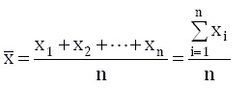
均值(Mean),即所有数据相加后的总和除以数据的个数得出的结果, 也称算术平均值。设一组样本数据为x1,x2,...,xn,样本数据的个数为n,则均值为:
注入攻击是OWASP总结的十大web安全风险中排在第一位的攻击形式, 而SQL注入(SQL Injection)攻击是注入攻击中最常见的一种形式。SQL注入漏洞可以从数据库读取敏感数据,修改数据库数据(插入/更新/删除),对数据库执行管理操作(例如关闭DBMS),恢复DBMS文件上存在的给定文件的内容系统,并在某些情况下向操作系统发出命令。
作为开发要防范这些攻击,就需要了解这些攻击方式。现列出Mysql数据库下几种常见SQL注入攻击示例,以作参考。

Elasticsearch是基于Apace Lunence构建的开源,分布式,具有高可用性和高拓展性的全文检索引擎。Elasticsearch具有开箱即用的特性,提供RESTful接口,是面向文档的数据库,文档存储格式为JSON,可以水平扩展至数以百计的服务器存储来实现处理PB级别的数据。
Elasticsearch可以快速存储,搜索,分析海量,索引数据速度达到毫秒级(近实时Near Real Time)。Github的代码搜索就是使用Elasticsearch来实现的。Elasticsearch使用场景有:
春节期间,公司组织远程培训,请Aws讲师培训Architecting on aws,属于aws架构培训中级课程。以下内容是个人做的笔记。
Pandas 是一个Python语言实现的,开源,易于使用的数据架构以及数据分析工具。在Pandas中主要有两种数据类型,可以简单的理解为:
在线实验:Pandas完全指南.ipynb
学习资料:
TCP 建立连接时要经过 3 次握手,在客户端向服务器发起连接时, 对于服务器而言,一个完整的连接建立过程,服务器会经历 2 种 TCP 状态:SYN_REVD, ESTABELLISHED。对应也会维护两个队列:
当一个连接的状态是 SYN RECEIVED 时,它会被放在 SYN 队列中。 当它的状态变为 ESTABLISHED 时,它会被转移到另一个队列。应用程序只从已完成的连接的队列中获取请求。
Lua诞生于1993年,是一种脚本语言,用C语言编写,其设计目的是为了快捷、高效嵌入到程序应用,比如Nginx服务器脚本。Redis从2.6.0版本开始内置Lua解释器,支持使用Eval命令运行Lua脚本。
在Redis中使用Lua脚本有两大特性:
原子性
Redis使用单个Lua解释器去运行所有脚本,当其在运行时,其他脚本或命令执行只能等待,这保证脚本已原子性方式运行。
高性能
Lua脚本一次可以执行多个redis命令,可以减少网络开销。对于较大脚本可以先使用SCRIPT LOAD 命令将其加载缓存中,然后使用EVALSHA运行近一步减少网络开销
原文:How To Manage Log Files Using Logrotate In Linux
几天前,我们发布了一份指南,介绍了如何在CentOS系统上设置集中式Rsyslog服务。今天,在本指南中,我们将了解如何在Linux上使用日志轮换来管理日志文件。该实用程序简化了日志文件的管理,尤其适用于每天生成大量日志文件的系统。顾名思义,LogRotate以固定的时间间隔将日志完全从系统中轮转出来。它还允许日志文件的自动轮转、压缩、删除和传输。每个日志文件可以每天、每周、每月或在变得太大时处理。